Frequently Asked Questions
Error: System file not found (OS Error)
This may be due to corrupted files or missing core. Solution: Delete old configuration, uninstall the old version, and reinstall.
Previous configuration and subscriptions lost after updating
From1.4.3version onwards,We changed the config file path,Recommended to delete old version before installing。You can find in app settings,“App Directory”,Find config file path。
TUN mode cannot be enabled
windowsPlease run as administrator,Or install service mode。mac/linuxPlease go to SettingsclashCore settings⚙️,Click"Authorize"
Service mode installation error
This is a known compatibility bug in older versions. It doesn't affect actual usage and has been fixed in the latest version.The only purpose of service mode is to enable TUN without administrator privileges.
Upgrade,Uninstall、Reinstall、When starting“Service mode”Related errors
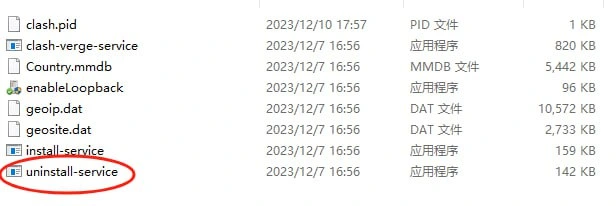
Navigate to the app directory and run uninstall-service.exe to uninstall service mode
Latency test lower/higher than before (discarded field settings)
In Clash fields, check or uncheck "unified-delay"
Verge cannot start normally
Repair, uninstall, and reinstall WebView2 https://developer.microsoft.com/zh-cn/microsoft-edge/webview2/#download
System tray icon visible but main window won't open
Use Windows 7 compatibility mode. Reference: https://github.com/zzzgydi/clash-verge/issues/717
macOS shows“File is damaged”
This is because the developer does not have an Apple Developer Program membership. Please run the following command in Terminal to authorize:
sudo xattr \-r \-d com.apple.quarantine /Applications/Clash\ Verge.app
macOS shows blank page when opening app
Please upgrade to macOS 11 or later. macOS 10 is not supported.
Change GUI log level for debugging
Open Clash Verge menu“Settings”-> Scroll to bottom and click“App Directory”,Edit verge.yaml with text editor,Change app_log_level: to app_log_level: debug
Logs too large, filling up disk
Can set log levelSettingstosilentorerror,and in“MiscSettings”inSettingsauto-cleanup time。
Subscription not showing total traffic (shows 0)
Known bug in 32-bit versions 1.4.11 and earlier. Please download the latest version.
Which version should I download?
- Windows: x64-setup.exe
- Windows ARM: arm64-setup.exe
- macOS Intel: x64.dmg
- macOS Apple Silicon: aarch64.dmg
- Linux x64: amd64.AppImage/amd64.deb
- WindowsPortable version: x64_portable.zip (Not recommended,Cannot auto-update)
Other strange issues:
Cannotinsubscription,Log error An attempt was made to access a socket in a way forbidden by its access permissions.](#CannotinsubscriptionLog error-an-attempt-was-made-to-access-a-socket-in-a-way-forbidden-by-its-access-permissions)
System service not started:
net stop hns
net start hns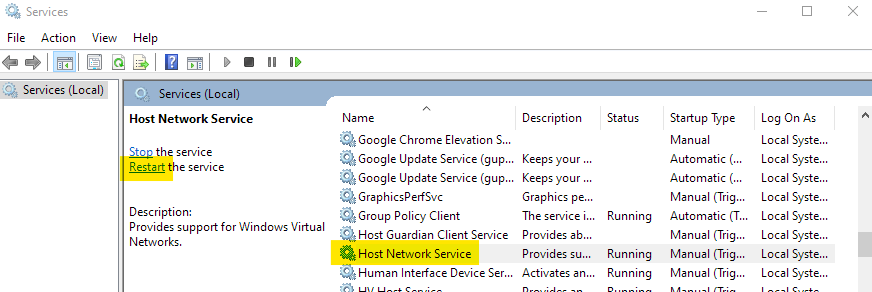
Webview2Cannot install properly
Maybe yourWindowsdisabled auto-update,Please enable auto-update。
Subscription import error:

UninstallReinstall。